

How it works
A simple process for real progress.
CopyBook ADAPT follows one clear cycle, so you can see what your child needs instead of guessing what to practise next.


Hi, I'm Pip. We start where your child is, not where the book says they should be.
CopyBook ADAPT
Five steps, round and round.
-
Assess
Start with work appropriate to the child and collect enough evidence to understand where support is needed.
A short check-in at their own standard, so the first week measures where they are, not where the book says they should be.
-
Detect gaps
Identify the learning gaps and the skills that may be holding later work back.
The skill underneath the mistake, not just the mark on the page.
-
Adapt path
Adjust the learning path around what the child has already shown, at their own standard.
The week's plan changes around what they showed, and it reaches down only where a gap was found.
-
Provide targeted intervention
Give targeted practice and intervention instead of simply adding more work.
Eight questions on the one topic, pages photographed and marked, and things to print for the topics they are on.
-
Track progress
Keep the parent informed as the child works and progresses — and start the cycle again.
What moved this week, on your phone or in a browser. Then the cycle begins again from what they can do now.
Swipe sideways, or use the arrow keys, to follow all five steps.
Parent and child devices
They work together.
Your child practises in the CopyBook app on an Android phone. You follow along from the parent side — on a phone, or in a browser.
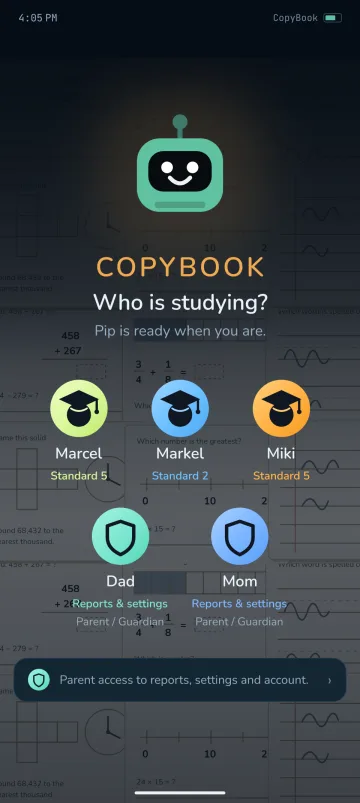
Add or select your child.
Pair the child's device with the household.
Confirm the pairing from the parent side.
The child carries on with the household's learning journey.

Get started
Ready to see the difference?
The app and the parent pages are two ways into the same CopyBook household — not separate accounts or separate progress records. New households begin with a free trial of 14 days or 60 credits, whichever comes first.